
Step 1Launch
Research before you list.
Review buyer demand, supplier suitability and marketplace requirements. Prepare a small batch you can check carefully. There is no fixed timeline for a first sale.
Ecomli’s AI listing tools
eBay dropshipping, simplified
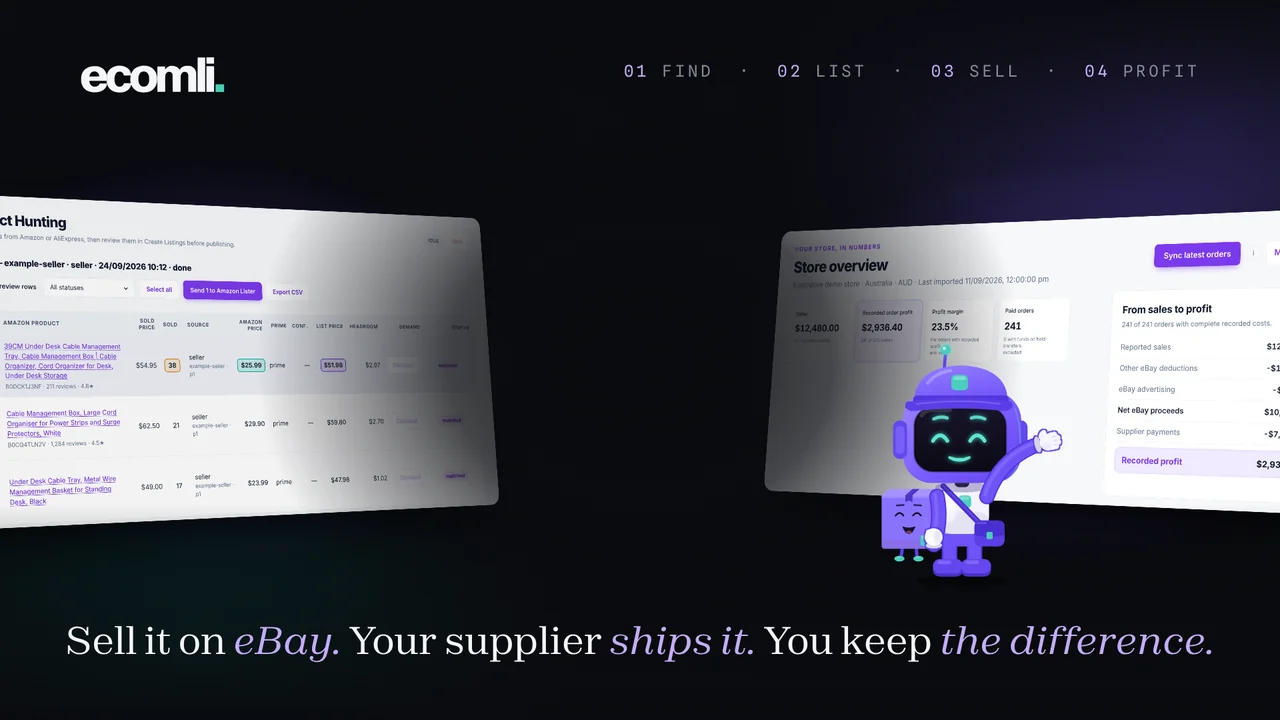
Ecomli finds products on Amazon and AliExpress, writes your eBay listings with AI, then helps you manage prices, stock and orders from one browser extension. It works in your signed-in eBay session, with no eBay API connection. No experience needed.
01 How the business works
Ecomli researches products, imports in bulk and uses AI to write your titles and descriptions. It then helps manage prices, stock, orders and profit, connecting your first product to the day-to-day running of your store.
Ecomli researches eBay sellers and matches products to suppliers. Its filters help you build a shortlist for your next batch.
Research & supplier matchingEcomli imports product details in bulk. Its AI writes titles and descriptions, while your pricing rules and templates shape each listing.
AI titles & AI descriptionsEcomli publishes your reviewed listings to eBay, then checks supplier prices and stock to help keep those listings up to date.
Safety Shield & monitoringEcomli syncs your eBay orders, tracks supplier costs and records profit. Purchase-price and loss limits help you review orders before buying.
Order sync & purchase controlsEcomli shows your performance and prunes listings using your rules. Use its AI wording and description templates to refine your store’s presentation.
AI wording & store insights02 Understand your margin
A sale is the starting point. Supplier costs, eBay fees, advertising and other expenses determine what remains. Review those costs before listing, then compare your estimates with the amounts you actually pay.
Review buyer demand, supplier suitability and marketplace requirements. Prepare a small batch you can check carefully. There is no fixed timeline for a first sale.
Include supplier cost, selling fees, advertising and delivery where applicable. Allow for returns and changing costs when choosing your pricing rules.
Review your orders, costs and recorded profit before expanding. Use what you learn to improve listings, adjust prices or remove products that no longer fit.
In this example, a $100 customer payment covers $52 in supplier cost, $8 in advertising and $12 in eBay fees, leaving $28 before tax and any other costs. Your actual fees, costs and results will differ.
View selected seller salesResearch a product, let AI draft the copy, and make it yours.
03 Selected seller examples
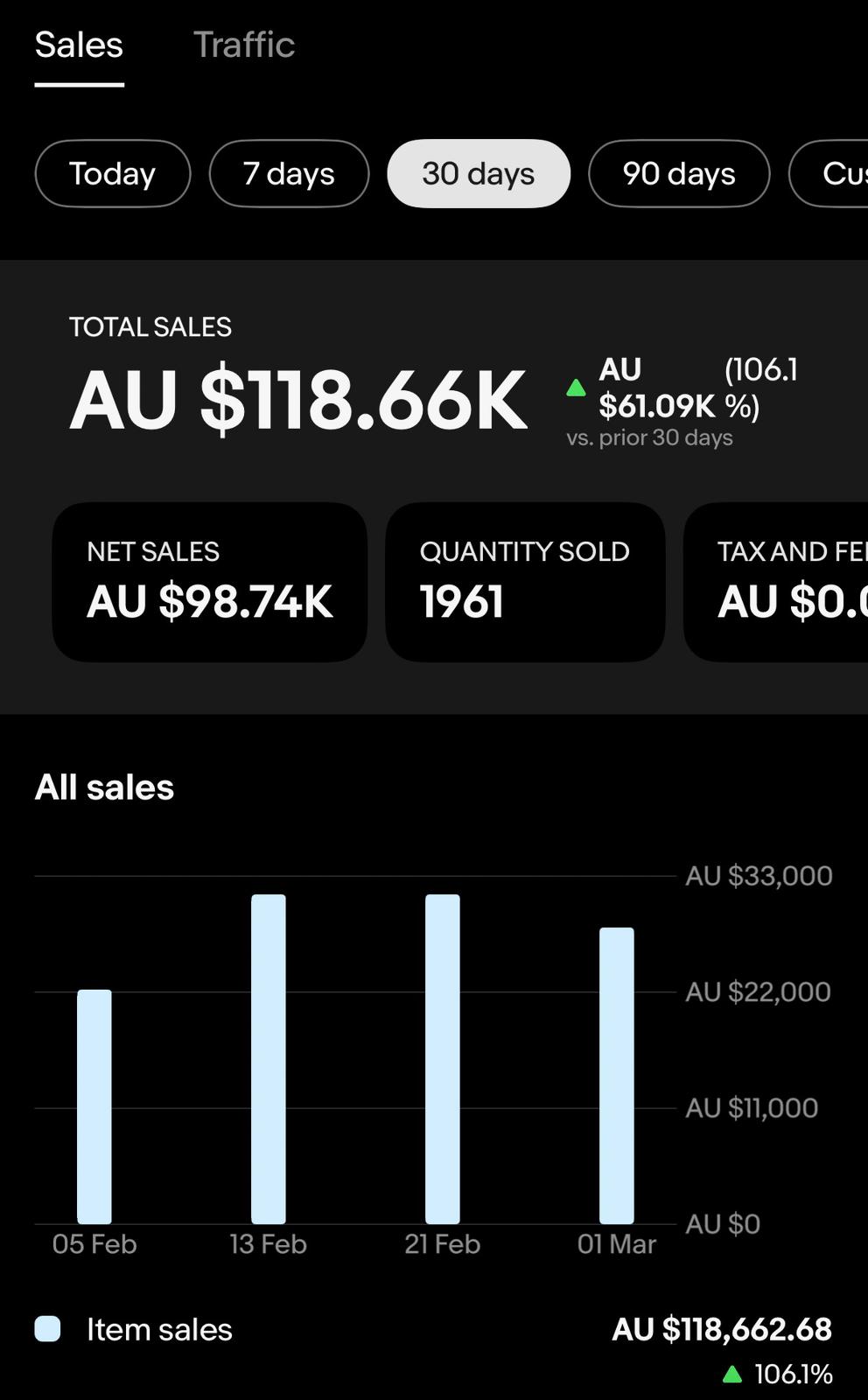
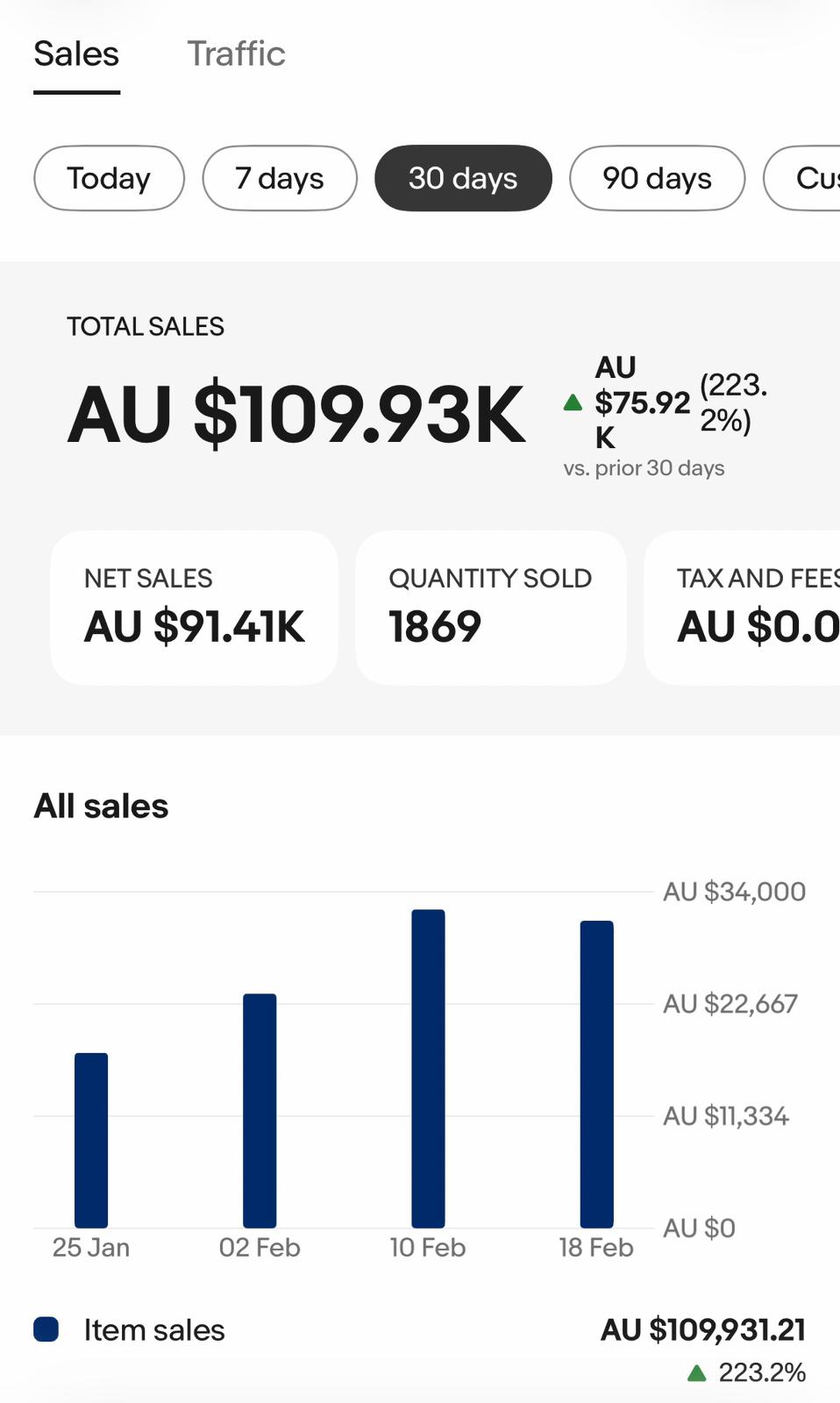
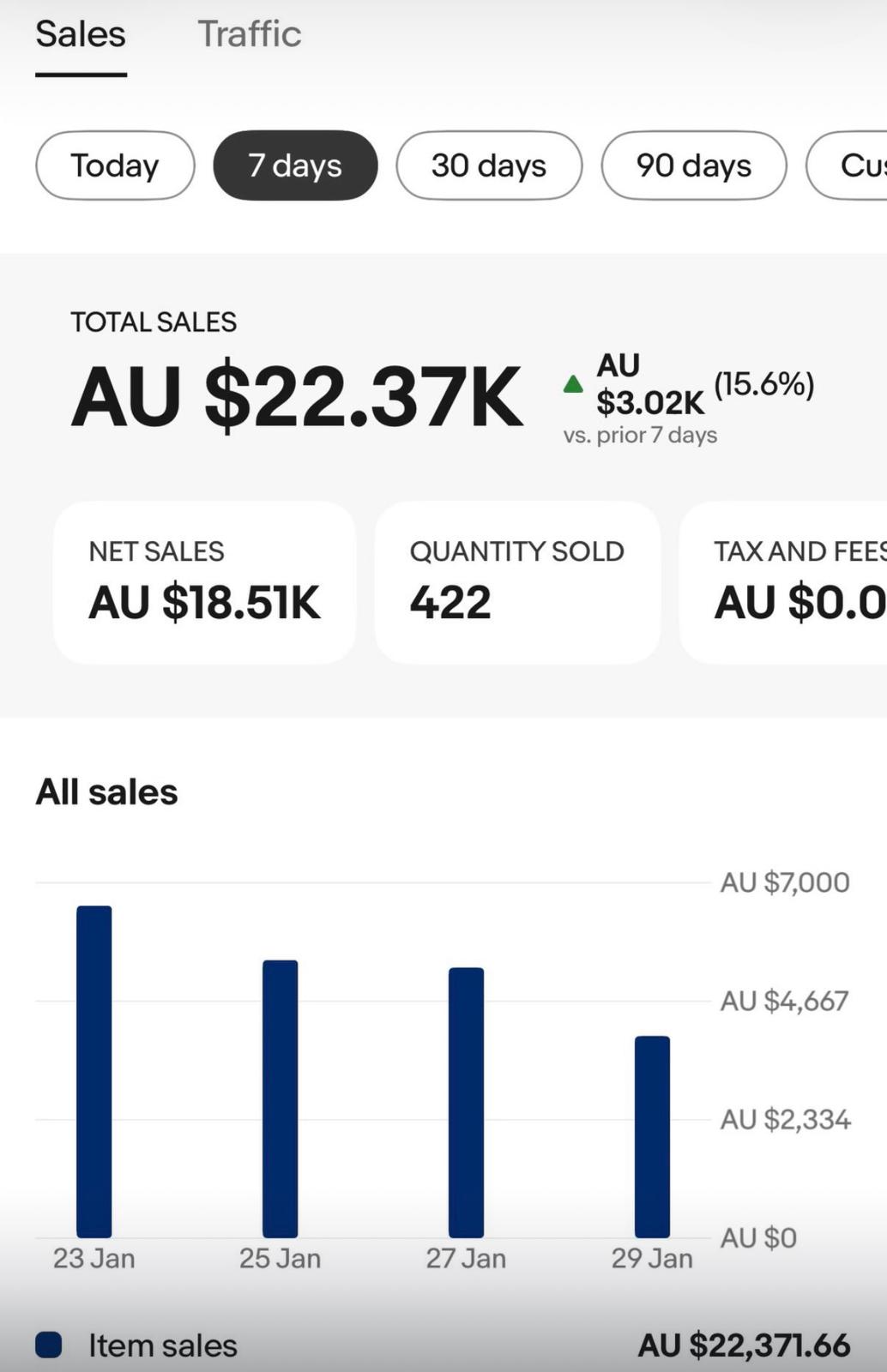
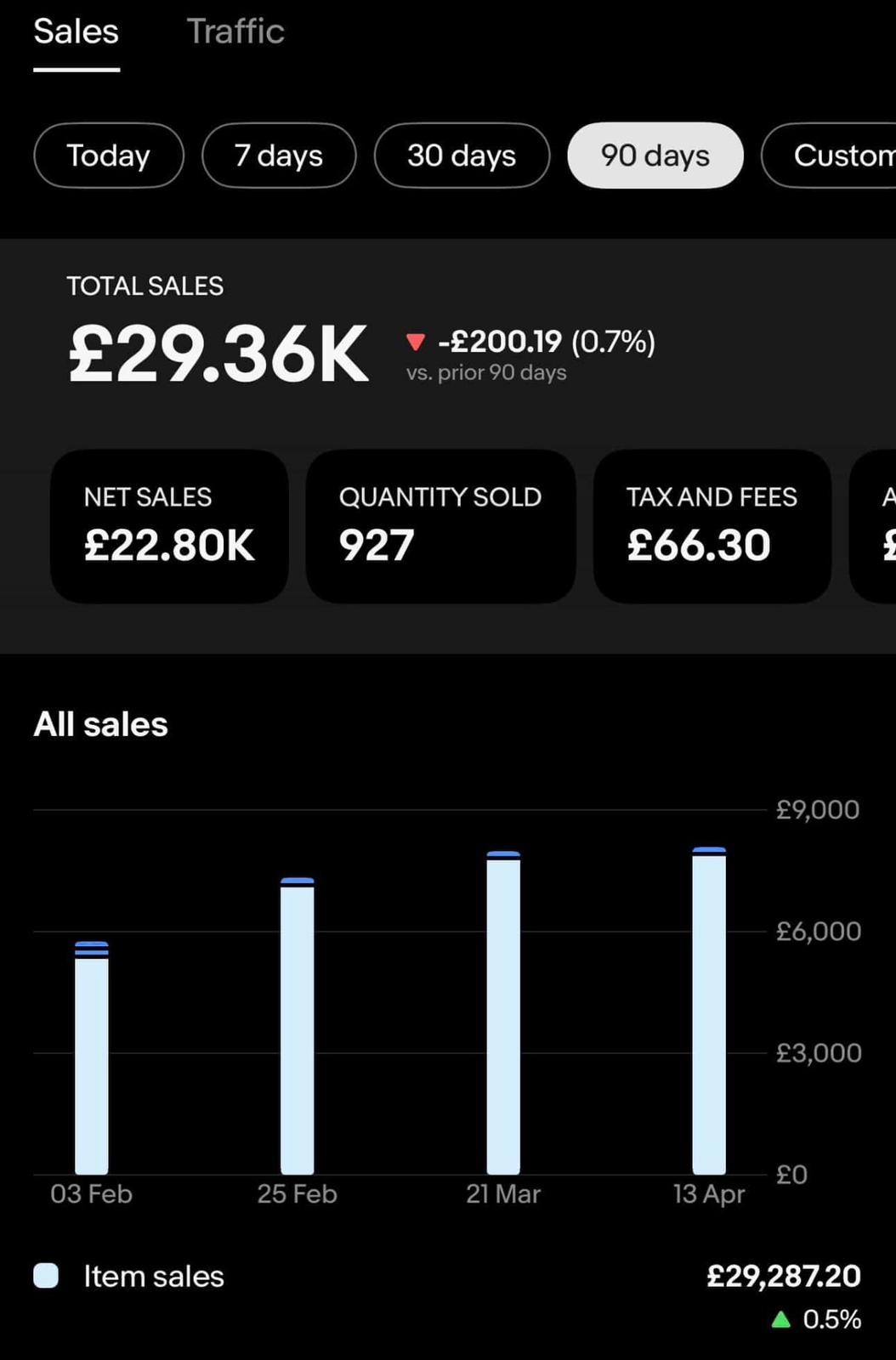
These selected eBay Seller Hub screenshots show gross sales over the periods below. Gross sales are before supplier costs, fees and other expenses. They do not show take-home income or predict what another seller will earn.
Every plan includes support and the members’ Discord.
04 Product Hunting
You don’t need to arrive with a product idea. Explore what other sellers list, search a topic or browse a supplier’s catalog. Ecomli helps you turn that research into your next listing.
Included in every plan
Use an eBay seller to research their listings and find supplier matches. Or start with Amazon keywords, an Amazon page or an AliExpress store.
Review product details, supplier matches and available sales information. Use price, keyword, review and rating filters to refine your results.
Send selected products to Create Listings. Ecomli prepares the product details, applies your pricing and drafts AI titles and descriptions for you to review.
Choose a place to start
Ecomli reviews sold history or current listings and looks for matching products on Amazon or AliExpress.
Search by keyword, or paste an Amazon store, search, category or Best Sellers page to collect products to review.
Ecomli collects products from the store and removes repeated links. Review delivery, stock and the exact options in Create Listings.
Keep the products you want to prepare.
Let Ecomli AI prepare your titles & descriptions.
Put Ecomli’s product research and AI listing tools to work.
05 Ecomli at work
AI listing copy. Supplier checks. Pricing rules. Order management. Ecomli’s browser extension brings the everyday work together, with you in control.
Choose your markup and stock settings. Ecomli checks supplier changes, calculates your listing prices and updates quantities using your out-of-stock and restocking rules.
Set up supplier accounts and choose your maximum purchase price and loss limits. Ecomli brings buying preferences and purchase status into one workflow.
Ecomli’s AI uses your product details to write titles and descriptions. Review the wording, make it yours, and pair it with a description template.
Ecomli converts supported Amazon and AliExpress tracking into eBay-compatible tracking, so buyers can follow their delivery right from their eBay order.
Bring in Amazon or AliExpress products. Ecomli prepares photos, variants, pricing and AI copy, with progress, pause and resume, and a result for each item.
Ecomli screens for flagged brands and restricted items during listing preparation. See what needs attention before you move ahead.
Animated examples · Illustrative demo data
Compare tools, product limits and support.
06 Non-API by design
Ecomli works through your signed-in browser session. No eBay API connection, no API authorization, and no switching to another engine as your store grows.
Research, create AI listings and manage your catalog through one non-API workflow. Your settings guide the work, and progress and results stay in view.
07 What you get
One Ecomli membership brings your selling tools, community and support together. Choose the plan that fits your store, then start putting it to work.
08 How it works
Install the extension, make it yours, and prepare your first products. Ecomli guides the work from setup to publication.
Install the Ecomli extension in your desktop browser. Sign in to Ecomli and eBay in the same browser profile, then check your seller session.
Choose your supplier, save your pricing preferences and pick a description template. Ecomli uses these settings as it prepares your products.
Choose a researched product. Ecomli prepares the details and AI copy, runs the listing checks, and guides publication with progress and results you can review.
Find a product, shape your AI draft and review it before publishing.
09 See it for yourself
Try the workflow with your own products, ask support when you need help and decide how Ecomli fits the way you want to sell.
On your first subscription payment, across every plan.
Pay your selected monthly rate upfront.
Use your plan’s tools, community and Ecomli support.
Email support within 7 days of your first subscription payment for a full refund.
10 Questions
The essentials, from your first install to your daily selling routine.
You can start with neither. Ecomli helps you research products, prepare listings and learn the workflow. Ecomli support and members-only Discord channels are included, along with the Learning hub’s step-by-step lessons.
No. Ecomli is non-API. It works through the browser extension and the eBay seller account signed in to your desktop browser, with no eBay API authorization step.
Use a supported desktop Chromium browser, such as Chrome, with the Ecomli extension installed. Sign in to Ecomli and your eBay seller account in the same browser profile. Keep the browser open, your computer awake and the internet connected while tasks run.
Product Hunting supports eBay seller research, Amazon keywords and product pages, and AliExpress stores. Use the available filters, review supplier matches, save a hunt or export results, then send selected products into Create Listings.
Start with the seller’s store or listings. Ecomli gathers the available product and sales information and helps you review supplier matches. Choose the products you want to prepare; research and selection are separate from publishing.
Ecomli’s AI uses source product details to draft titles and descriptions. You can review and edit the wording and use description templates and branding tools to shape the presentation. AI copy does not guarantee search rankings or sales.
There is no fixed timeline. Demand, pricing, listing quality and your store all matter. Start with products you have researched, review your listings, and bring questions to the community or Ecomli support as you work through what to improve.
Start a Stock Monitoring run. Ecomli checks supplier prices and availability and applies your repricing, out-of-stock and restocking settings. Review the update results and any items that need attention.
No tool can guarantee that. Non-API describes how Ecomli works: through your browser, without an eBay API connection. eBay’s seller policies still apply. Safety Shield screens for flagged brands and restricted items before publication; it is a checkpoint, not a guarantee of account safety.
Orders brings together order status, supplier costs, fees, advertising charges, refunds and recorded profit. On every plan, you can scan your eBay sales and start a batch of AliExpress orders. Pro and Scale add opt-in hourly ordering for new sales. Ecomli creates the orders unpaid, within your purchase-price and loss limits, and you review and pay in AliExpress. Orders outside your limits need manual handling.
Ecomli is built for selling on eBay. Amazon and AliExpress are product sources in the extension, not additional selling channels. Choose the marketplace available for your account during setup.
Starter and Pro include one eBay account. Scale includes 3 eBay account seats and 1 VA seat, with 10,000 monthly imports shared across accounts. Extra monthly imports, eBay accounts and VA seats can be added through Billing in the extension settings.
Your selected plan is billed upfront. If Ecomli is not the right fit, email support@ecomli.com within 7 days of your first subscription payment for a full refund. The guarantee applies to your first subscription payment. Subscriptions renew until cancelled. See our Refund Policy for details.
Every plan includes Product Hunting, AI listing tools, description templates, monitoring, Safety Shield, Tracking Conversions, manual AliExpress order batches, Auto Messages, migration from AutoDS, EcomSniper or an eBay CSV, a profitability dashboard, Discord and support. Pro adds image templates, opt-in hourly AliExpress ordering and Basic Auto Pruner for listing cleanup. Scale adds Advanced Auto Pruner with automatic relisting, multiple eBay accounts and a VA seat. Monthly product imports vary by plan. Every plan includes unlimited active listings.
Every plan includes Ecomli support by email and members-only Discord channels, plus the Learning hub: step-by-step lessons on the business model, the tools and your daily routine, open from your member area.
11 Get started
AI tools for the work. Community and support for the questions along the way. Your eBay business starts with a first step.
Compare plans and inclusions